EDRLab is a "non-profit development laboratory working on the deployment of an open, interoperable and accessible digital publishing ecosystem worldwide." It has over 100 members, but some of its founding members are: Editis, Hachette, Centre National du livre, Groupe Madrigall and the French State. EDRLab is a member of W3C and Readium Foundation. It is one of the main contributors to Readium toolkits and the manager of Readium LCP DRM. They are also the creators of Thorium Reader, an EPUB reading application.[1][2][3] They also focus on accessibility in order to increase the number of books available to people with disabilities.[4]

| Basic information | |
|---|---|
| Founded | 2015-07-17 |
| Legal Structure | Non-profit |
| Industry | Software |
| Also known as | European Digital Reading Lab |
| Official website | https://www.edrlab.org/ |
Consumer-impact summary
EDRLab is one of the main contributors to Readium LCP DRM. Their EPUB reader application, Thorium Reader, which uses LCP, claims to be private, yet it has "non-personal" data collection that the user cannot opt out of. It also contacts EDRLab's servers every time the application is started.
This is not apparent, since Thorium's installer doesn't inform the user of this, there are no "agree/disagree" options and Thorium's interface does not directly link to either the Terms of service or the Privacy policy (see: User not clearly presented with terms. Users also wouldn't be notified if the privacy policy were to change, since that would require them to manually check the Privacy policy page for updates.
The Terms of service also mentions that the user agrees to "indemnify and hold harmless the EDRLab Parties" even for "alleged" breaches by the user of the Terms of service. It is also stated that "EDRLab Parties have the right to monitor the use of the Application."
The application is also deceptively marketed as open source as it is stated in the privacy policy that it is in fact not entirely open source, but rather has a "small software library used as core for the Readium LCP DRM, which does not store or send any data." This requires users to trust the company on their word, since users cannot inspect the application, as they may not "rent, sell, modify, decompile, disassemble, reverse engineer or transfer the Application in whole or in part", according to the Terms of service. Furthermore, this connects directly to the 2nd paragraph. The Terms of service as well as the Privacy policy are discussed in more detail in the "Incidents" section (see: Thorium Reader privacy policy and terms of use).
Incidents
Thorium Reader privacy policy and terms of use
Privacy policy
Despite Thorium's homepage stating that:
This application is free, with no ads and no private data leaks.
[5]There is data collection, but it is stated that it is "non-personal." The application calling itself private might give some users the wrong impression, if they take that to mean "no phoning home." The reader sends this "non-personal" data to EDRLab's servers. It is impossible to opt out of "notifications" that are sent to a server every time the application is started. They state that this information
is for analytics only and not accessed by any third party. It is used to get information about the evolution of the number of installs of the application per operating system, the evolution of usage sessions and the main locales in use.
And:
Parameters of such notification are:
- a timestamp,
- the version of Thorium Reader,
- the operating system of the device and its version,
- the locale of the application at the time it is started,
- if this is the first start of Thorium Reader after a fresh install.
The IP address of the device is not stored along with the above information.
It is not possible to opt-out from this notification.
Also:
a notification is sent to an LCP Server each time a protected publication is open. This is required by the LCP specification for checking if the license of use of the publication has been updated. There is not centralized LCP Server, each server is operated by the distributor of the protected publication acquired by the user.
Parameters of such notification are:
- a device identifier, automatically generated at the install of the application.
- a device name, automatically generated at the install of the application.
The codebase of Thorium Reader is open-sourced and can therefore be fully inspected, with the exception of a small software library used as core for the Readium LCP DRM, which does not store or send any data.
The terms of privacy policy can also evidently be changed without users being notified in their actual reading application, but rather:
We may change the Privacy Policy from time to time. We will notify you by posting the revised Privacy Policy on this page and the date on which the last changes were made will be noted at the top of the page.
So users would have to periodically check this site to know whether any terms have changed.
Terms of service
Moving on to the Terms of service, there are several interesting things. First:
You hereby agree to indemnify and hold harmless the EDRLab Parties from and against any and all claims, actions or proceedings of any nature whatsoever and all damages, judgments, losses, liabilities, costs and expenses, including reasonable attorneys’ fees and expenses (including those incurred to enforce this provision), arising out of your use of the Application, the Content, any actual or alleged breach by you of these Terms of Use, or any violation by you of any applicable law or the rights of any other person or entity.
Especially:
any actual or alleged breach by you of these Terms of Use
As per this, one is agreeing to "indemnify and hold harmless the EDRLab Parties" even for alleged breaches of the terms of service.
In one of the quotes above, it is mentioned that due to Thorium's open source nature, one can inspect its source code apart from a "small software library used as core for the Readium LCP DRM, which does not store or send any data" Which, one cannot verify that part, since:
In addition, you may not rent, sell, modify, decompile, disassemble, reverse engineer or transfer the Application in whole or in part. You may not use any device, software or routine to interfere with or attempt to interfere with the proper functioning of the Application in whole or in part.
So it would appear that it is up to individual users to decide if not being able to verify that part is acceptable to them. Finally, there is also this:
However, you acknowledge that the EDRLab Parties have the right to monitor the use of the Application, at its sole discretion, and to disclose any information necessary to comply with any law, regulation or government request, in order to be able to operate the Application adequately or in order to protect itself or its users under the “Privacy Policy”
[6][7]The above summarizes and discusses Thorium's Privacy policy and Terms of service. Readers are encouraged to consult both the Privacy policy and the Terms of service for themselves and form their own conclusions.
User not clearly presented with terms
During the installation process, the user is not clearly presented with the Terms of use or the Privacy policy. There is no option to agree or disagree to the terms and the privacy policy, nor are they directly linked in the app (see: Installation and Post-installation). While it is not possible to opt out, the user doesn't know that during installation, unless they'd scrolled on Thorium's webpage to find the Terms of use and the Privacy policy, or unless they'd found them wherever they're installing the app from (e.g. Microsoft Store). See External links for installation videos of Thorium.[8][9]
Installation
-
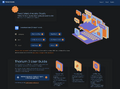 Installation step: 1 (installation page)
 -
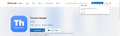 Installation step: 1 (alternative on Windows: Microsoft Store)
 -
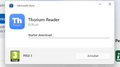 Installation step: 2 (Thorium being installed)
 -
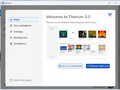 Installation step: 3 (Thorium's welcome page upon first launch)


No direct presentation of the Terms of use or the Privacy policy during installation (example on Windows).
Step 0
The Terms of use and the Privacy policy can be located on the homepage by scrolling down to the "Terms of Use, Privacy Policy" section.[5]
Step 1
On the installation page (step 1), the user would have to click on "Support" on the top right (or "Minimum system requirement" in the center-left) and then locate the "About Thorium Reader" section on the bottom left. This is not the same page as the "About" located next to "Support."[10][11]
Microsoft Store
On the Microsoft Store (alternative step 1 for Windows), the "Additional information" section contains links to the Privacy policy and the "Terms of transaction." The former leads to EDRLab's "Legal Information" page, not the actual privacy policy on the site that the "About Thorium (Online)" opens (it is also in French, even with the computer's language set to English)[12].
The latter link leads to a "Microsoft Store Terms of Sale" (which is not the same as the app's Terms of use). There is also a website link, but it opens a different website[13] than the one Thorium Reader opens when clicking "About Thorium (Online)" (see External links).[14] That site site has a "Legal Notices" (not to be confused with the aforementioned "Legal Information" page) link, through which users can locate the Terms of service and the Privacy policy.[13][15]
Step 2 & 3
The installer does not have a link to the Privacy policy or the Terms of service, but after installation (after getting past the welcome screen in image 3), one can use the "About Thorium (Online)" link to go to the app's website and locate the documents (see Step 0).[5]
Post-installation
-
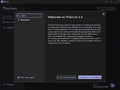 Searching for terms in the app: 1
 -
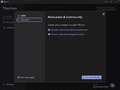 Searching for terms in the app: 2
 -
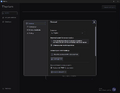 Searching for terms in the app: 3
 -
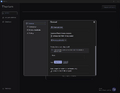 Searching for terms in the app: 4


Again, no clear mention of the Terms of use or the Privacy policy. The user would have to click the "About Thorium (Online)" link, visible on the bottom right of the images, which would open the app's website in the browser. Then, the user would have to scroll down to locate the "Terms of Use, Privacy Policy" section, where they'd find the links.
Products
- Thorium Reader
- Readium LCP (main contributor)
- Lis mon Livre
See also
References
- ↑ "About". edrlab.org. Archived from the original on 2 May 2026. Retrieved 24 Jun 2026.
- ↑ "EDRLab members directory". Archived from the original on 3 Mar 2026. Retrieved 24 Jun 2026.
- ↑ "SITUATION AU REPERTOIRE SIRENE". insee.fr (in français). 24 Jun 2026. Archived from the original on 24 Jun 2026.
- ↑ "Accessibility". edrlab.org. Archived from the original on 25 Jun 2026.
- ↑ 5.0 5.1 5.2 "Thorium Reader". edrlab.org. Archived from the original on 19 Jun 2026. Retrieved 24 Jun 2026.
- ↑ "Thorium Reader – Terms of Use". edrlab.org. 22 Nov 2022. Archived from the original on 17 Jun 2026. Retrieved 24 Jun 2026.
- ↑ "Thorium Reader – Privacy Policy". edrlab.org. 22 Nov 2022. Archived from the original on 17 Jun 2026. Retrieved 24 Jun 2026.
- ↑ Stine Kjær Kappel (24 Feb 2026). "installer_thorium_pc". edumedia.dk. Archived from the original on 25 Jun 2026.
- ↑ Stine Kjær Kappel (24 Feb 2026). "installer_thorium_mac". edumedia.dk. Archived from the original on 25 Jun 2026.
- ↑ "Thorium Reader". thorium.edrlab.org. Archived from the original on 27 Jun 2026.
- ↑ "Thorium 3 support". thorium.edrlab.org. Archived from the original on 27 Jun 2026.
- ↑ "Legal Information". edrlab.org (in français). Archived from the original on 27 Jun 2026.
- ↑ 13.0 13.1 "Thorium Reader". thoriumreader.com. Archived from the original on 27 Jun 2026.
- ↑ "Thorium Reader". apps.microsoft.com. Archived from the original on 27 Jun 2026.
- ↑ "Thorium Reader Conformance Reports". conformance.thoriumreader.com. Archived from the original on 27 Jun 2026.