Consumer Rights Wiki:Write your first article!: Difference between revisions
I will add this later, this is meant to be a list of all templates w/ exmaple |
|||
| Line 43: | Line 43: | ||
===Basic Info=== | ===Basic Info=== | ||
* You can make edits using the '''visual editor''' by clicking the "edit" button at the top of an article, or using the '''source editor''' by clicking "edit source" instead. | *You can make edits using the '''visual editor''' by clicking the "edit" button at the top of an article, or using the '''source editor''' by clicking "edit source" instead. | ||
** The '''visual editor''' is easier to use. It's '''recommended''' to start with this. It's more intuitive in multiple ways, but doesn't allow for complete control like the source editor. | **The '''visual editor''' is easier to use. It's '''recommended''' to start with this. It's more intuitive in multiple ways, but doesn't allow for complete control like the source editor. | ||
** The '''source editor''' is the advanced editor. You should ignore it for your first few edits, then check it out when you're comfortable with the visual editor. It allows for direct access to the markup language, and generally has more features and control. One downside is that you have to click '''Preview''' to see how it'll look. ''You might find yourself using this more often as you gain experience.'' | **The '''source editor''' is the advanced editor. You should ignore it for your first few edits, then check it out when you're comfortable with the visual editor. It allows for direct access to the markup language, and generally has more features and control. One downside is that you have to click '''Preview''' to see how it'll look. ''You might find yourself using this more often as you gain experience.'' | ||
** ''Source editor is forced on some namespaces (Talk: and Soyjak_Wiki: for example). This is okay. Proceed as normal, and do add a signature when you write on talk pages.'' | **''Source editor is forced on some namespaces (Talk: and Soyjak_Wiki: for example). This is okay. Proceed as normal, and do add a signature when you write on talk pages.'' | ||
* The wiki uses a markup language called [[mediawikiwiki:Help:Formatting|wikitext]] for formatting. For example, <code><nowiki>'''bold'''</nowiki></code> for '''bold''' text and <code><nowiki>[[link|text to display for the link]]</nowiki></code> for a [[Consumer_Rights_Wiki:Style_guide|link]]. The visual editor can handle most of this. | *The wiki uses a markup language called [[mediawikiwiki:Help:Formatting|wikitext]] for formatting. For example, <code><nowiki>'''bold'''</nowiki></code> for '''bold''' text and <code><nowiki>[[link|text to display for the link]]</nowiki></code> for a [[Consumer_Rights_Wiki:Style_guide|link]]. The visual editor can handle most of this. | ||
:Here are some examples: | :Here are some examples: | ||
:* '''Bold text''': <code><nowiki>'''bold text'''</nowiki></code> | :*'''Bold text''': <code><nowiki>'''bold text'''</nowiki></code> | ||
:* ''Italic text'': <code><nowiki>''italic text''</nowiki></code> | :*''Italic text'': <code><nowiki>''italic text''</nowiki></code> | ||
:* '''''Bold and italic text''''': <code><nowiki>'''''bold and italic'''''</nowiki></code> | :*'''''Bold and italic text''''': <code><nowiki>'''''bold and italic'''''</nowiki></code> | ||
:* <s>Strikethrough text</s>: <code><nowiki><s>Strikethrough</s></nowiki></code> | :*<s>Strikethrough text</s>: <code><nowiki><s>Strikethrough</s></nowiki></code> | ||
:* Internal link: <code><nowiki>[[Page name]]</nowiki></code> | :*Internal link: <code><nowiki>[[Page name]]</nowiki></code> | ||
:* Internal link with custom text: <code><nowiki>[[Page name|custom text]]</nowiki></code> | :*Internal link with custom text: <code><nowiki>[[Page name|custom text]]</nowiki></code> | ||
:* External link: <code><nowiki>[https://example.com Example]</nowiki></code> → [https://example.com Example] | :*External link: <code><nowiki>[https://example.com Example]</nowiki></code> → [https://example.com Example] | ||
:* Headings: <code><nowiki>== Heading 2 ==</nowiki></code>, <code><nowiki>=== Heading 3 ===</nowiki></code> | :*Headings: <code><nowiki>== Heading 2 ==</nowiki></code>, <code><nowiki>=== Heading 3 ===</nowiki></code> | ||
:* Lists: | :*Lists: | ||
:** Bullet: <code><nowiki>* Item</nowiki></code> | :**Bullet: <code><nowiki>* Item</nowiki></code> | ||
:** Numbered: <code><nowiki># Item</nowiki></code> | :**Numbered: <code><nowiki># Item</nowiki></code> | ||
:* Sign your comments on talk pages with: <code><nowiki>~~~~</nowiki></code> → automatically adds your name and timestamp. Make sure you always do so when using talk pages. | :*Sign your comments on talk pages with: <code><nowiki>~~~~</nowiki></code> → automatically adds your name and timestamp. Make sure you always do so when using talk pages. | ||
:* You can experiment in the [[Sandbox|sandbox]] if you want to try editing without affecting any real pages. | :*You can experiment in the [[Sandbox|sandbox]] if you want to try editing without affecting any real pages. | ||
===Advanced section=== | ===Advanced section=== | ||
You can ignore this section until you have some experience under your belt and are comfortable with the basics. | You can ignore this section until you have some experience under your belt and are comfortable with the basics. | ||
* If you want to add colored text, backgrounds, and borders, then the wiki also supports HTML and CSS styling, mainly through the source editor. To use this, first surround the text you want to style in html tags like <code><nowiki><span>this</span></nowiki></code> or <code><nowiki><div>this</div></nowiki></code>, and then in the first tag, add style="property1;property;2;property3; where each property has a semicolon after it, for example <code><nowiki><span style="font-size:10px;color:red;font-weight:bold;>test</span></nowiki></code> becomes <span style="font-size:10px;color:red;font-weight:bold;">test</span>. | *If you want to add colored text, backgrounds, and borders, then the wiki also supports HTML and CSS styling, mainly through the source editor. To use this, first surround the text you want to style in html tags like <code><nowiki><span>this</span></nowiki></code> or <code><nowiki><div>this</div></nowiki></code>, and then in the first tag, add style="property1;property;2;property3; where each property has a semicolon after it, for example <code><nowiki><span style="font-size:10px;color:red;font-weight:bold;>test</span></nowiki></code> becomes <span style="font-size:10px;color:red;font-weight:bold;">test</span>. | ||
Speaking of colored text and backgrounds, you can use '''templates''' to reuse common elements (like infoboxes, alerts, and formatting): | Speaking of colored text and backgrounds, you can use '''templates''' to reuse common elements (like infoboxes, alerts, and formatting): | ||
Templates work using a feature called '''transclusion'''. This just means one page can automatically include the contents of another. When the original page is updated, every page that includes it will show the updated version too. | [[Help:Templates|Templates]] work using a feature called '''transclusion'''. This just means one page can automatically include the contents of another. When the original page is updated, every page that includes it will show the updated version too. | ||
There are a few ways to use templates: | There are a few ways to use templates: | ||
* In the visual editor, click '''Insert > Template''' to bring up the template wizard. | *In the visual editor, click '''Insert > Template''' to bring up the template wizard. | ||
* Or, in source mode, type the code yourself: | *Or, in source mode, type the code yourself: | ||
** <code><nowiki>{{Template:Template name}}</nowiki></code> — when the page starts with <code>Template:</code> | **<code><nowiki>{{Template:Template name}}</nowiki></code> — when the page starts with <code>Template:</code> | ||
** <code><nowiki>{{:Page name}}</nowiki></code> — when it's a regular page (like a subpage or shortcut) | **<code><nowiki>{{:Page name}}</nowiki></code> — when it's a regular page (like a subpage or shortcut) | ||
For example: | For example: | ||
* <code><nowiki>{{Main Page/In The News}}</nowiki></code> brings in the "In The News" section from that subpage. | *<code><nowiki>{{Main Page/In The News}}</nowiki></code> brings in the "In The News" section from that subpage. | ||
* <code><nowiki>{{InfoboxCompany}}</nowiki></code> includes a company style infobox. | *<code><nowiki>{{InfoboxCompany}}</nowiki></code> includes a company style infobox. | ||
You can combine this with HTML and styling to make really useful and reusable page elements. If you're curious, go look at the source of one of the templates on the wiki! | You can combine this with HTML and styling to make really useful and reusable page elements. If you're curious, go look at the source of one of the templates on the wiki! | ||
Revision as of 20:02, 7 July 2025
Welcome to the Consumer Rights Wiki! If you're reading this, you likely share our desire to see consumers treated more fairly. This article will help you to start documenting an instance of "new" consumer exploitation, so you can help us to further that cause.
Before getting started, you need to know some of the requirements for a new article on this wiki. The wiki policy covers all the guidelines that mature articles need to follow, but reading these guidelines from start to finish may be a daunting task for new contributors. The next section describes the minimum requirements in order to write an article that can be molded into complying with these guidelines in a reasonable amount of time. The last section describes how to edit and create articles.
Don't have a topic to write about? Visit How to help to see what the wiki needs!
Minimum requirements
New articles must, at a minimum, meet the following three requirements:
Claims must be easily verifiable
A claim is verifiable if:
- A verifiable source can easily be found by means of an internet search, or
- A verifiable source has been referenced using the instructions in Adding references
Articles should only consist of verifiable claims. Claims that make assumptions or are based on personal experiences or isolated incidents are not valid. For example, "Motorola is pushing updates to their older phones that intentionally slow them down" would only be considered valid if a verifiable source proves it.
Include at least one verifiable source
Every article must include at least one verifiable source. This allows contributors to understand why certain claims were made, as well as to expand on the article using the information provided by the source.
For more information about what constitutes a verifiable source, see the wiki content policies.
Verifiable sources do not include anecdotal social media posts. For example, the public opinion reflected by the comments under a Reddit post is not a verifiable source.
Issues must be systemic
This wiki is not the place to document isolated incidents, such as a company who unfairly rejected a few warranty claims or a plumbing contractor who charged you more than they should have. The incidents documented in this wiki have affected large amounts of consumers.
The following examples were summarized from the moderator guidelines:
- Not systemic
-
- Amazon broke into my garage.
- AppleCare replaced my Apple Watch multiple times, costing me nearly $1,300. All replacements were scratched and lacked functionality.
- Systemic
-
- Galaxy Fold blank screen update: The Galaxy Fold received an update that caused auto-rotate failures, blank screens and sound problems in many devices. Samsung only offered paid repairs, claiming that the issue affected only 3% of users.
- Motorola warranty issue: Users report extended service times and denied warranty claims across different countries with their devices, which started experiencing issues after updates under Lenovo ownership.
Creating an article
Ready to make an new article? Click the Create page link on the sidebar. Make sure that the name of the article is singular and in lowercase except for when it's a proper noun like a name. If you are new around here and not sure how to get started, you should follow the guide down below.
Basic Info
- You can make edits using the visual editor by clicking the "edit" button at the top of an article, or using the source editor by clicking "edit source" instead.
- The visual editor is easier to use. It's recommended to start with this. It's more intuitive in multiple ways, but doesn't allow for complete control like the source editor.
- The source editor is the advanced editor. You should ignore it for your first few edits, then check it out when you're comfortable with the visual editor. It allows for direct access to the markup language, and generally has more features and control. One downside is that you have to click Preview to see how it'll look. You might find yourself using this more often as you gain experience.
- Source editor is forced on some namespaces (Talk: and Soyjak_Wiki: for example). This is okay. Proceed as normal, and do add a signature when you write on talk pages.
- The wiki uses a markup language called wikitext for formatting. For example,
'''bold'''for bold text and[[link|text to display for the link]]for a link. The visual editor can handle most of this.
- Here are some examples:
- Bold text:
'''bold text''' - Italic text:
''italic text'' - Bold and italic text:
'''''bold and italic''''' Strikethrough text:<s>Strikethrough</s>- Internal link:
[[Page name]] - Internal link with custom text:
[[Page name|custom text]] - External link:
[https://example.com Example]→ Example - Headings:
== Heading 2 ==,=== Heading 3 === - Lists:
- Bullet:
* Item - Numbered:
# Item
- Bullet:
- Sign your comments on talk pages with:
~~~~→ automatically adds your name and timestamp. Make sure you always do so when using talk pages.
- Bold text:
- You can experiment in the sandbox if you want to try editing without affecting any real pages.
Advanced section
You can ignore this section until you have some experience under your belt and are comfortable with the basics.
- If you want to add colored text, backgrounds, and borders, then the wiki also supports HTML and CSS styling, mainly through the source editor. To use this, first surround the text you want to style in html tags like
<span>this</span>or<div>this</div>, and then in the first tag, add style="property1;property;2;property3; where each property has a semicolon after it, for example<span style="font-size:10px;color:red;font-weight:bold;>test</span>becomes test.
Speaking of colored text and backgrounds, you can use templates to reuse common elements (like infoboxes, alerts, and formatting):
Templates work using a feature called transclusion. This just means one page can automatically include the contents of another. When the original page is updated, every page that includes it will show the updated version too.
There are a few ways to use templates:
- In the visual editor, click Insert > Template to bring up the template wizard.
- Or, in source mode, type the code yourself:
{{Template:Template name}}— when the page starts withTemplate:{{:Page name}}— when it's a regular page (like a subpage or shortcut)
For example:
{{Main Page/In The News}}brings in the "In The News" section from that subpage.{{InfoboxCompany}}includes a company style infobox.
You can combine this with HTML and styling to make really useful and reusable page elements. If you're curious, go look at the source of one of the templates on the wiki!
This stuff is optional, but powerful — it's worth playing around with once you've gotten the hang of basic editing.
Adding references
New references
To reference a new source:
-
Place the cursor after a claim.

-
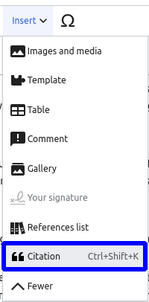
Click on "Insert" → "Citation", or press Ctrl+Shift+K.
-
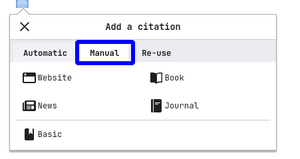
Click the "Manual" option and choose the type of citation you wish to add.
- In the following tab add the information for your citation. (If you don't have enough time choose the "Basic" option to add a simple link)


Existing references
To re-use a source that is referenced elsewhere on the same page:
-
Place the cursor after a claim.

-
Click on "Insert" → "Citation", or press Ctrl+Shift+K.
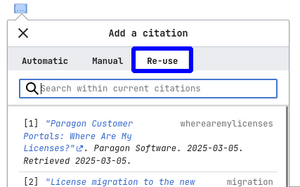
- Click the "Re-use" option and choose the type of citation you wish to re-use.